Request a pilot

Only 10 pilot spots. Free for 90 days.

Run your whole countertop shop from one simple app.

Quotes, slabs, remnants, layouts and the shop schedule, all in one place. Built for shop owners and crews, not computer people.

  • One flat price
  • Your whole crew included
  • Works on any phone
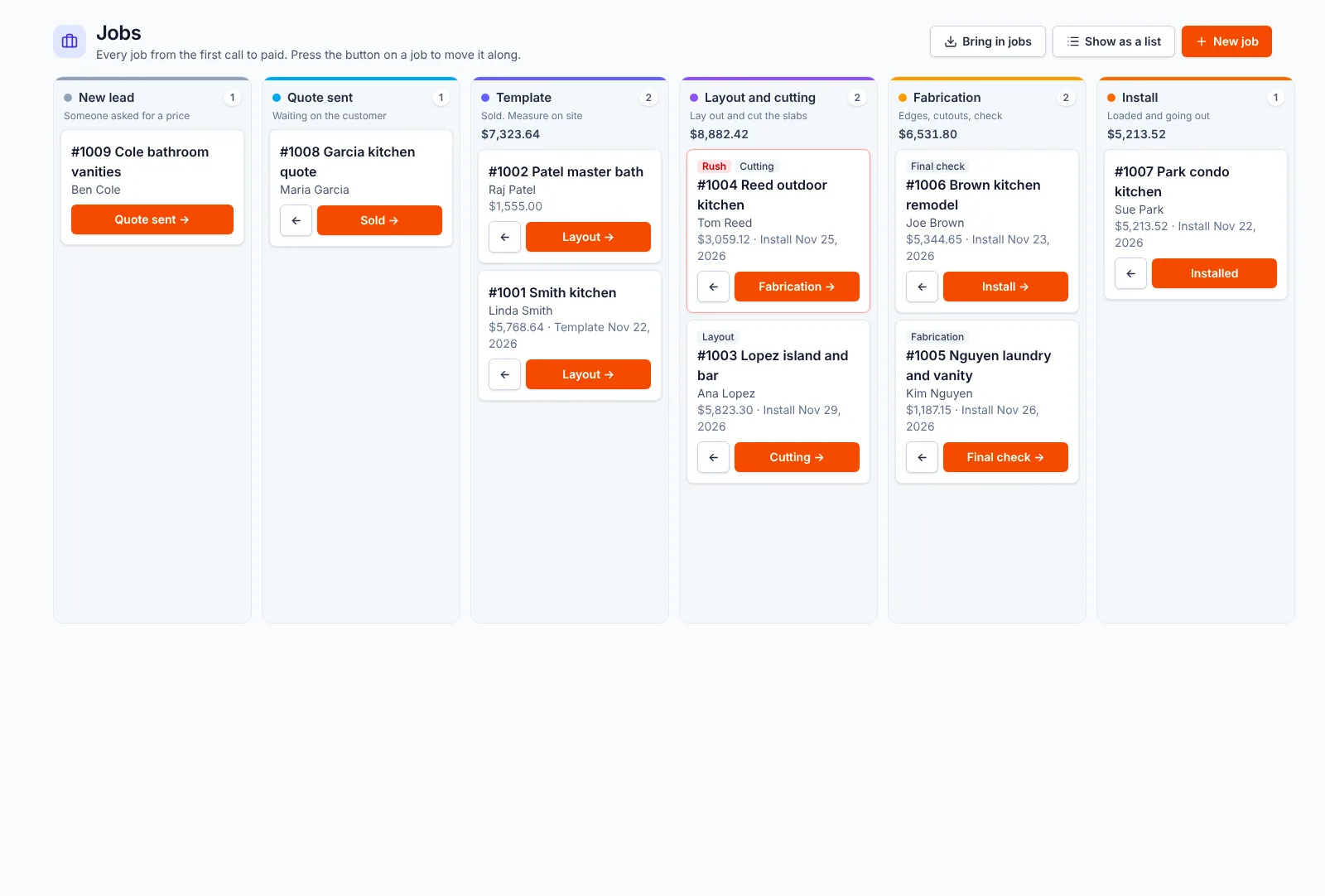
Seamline job board: every job from new lead to quote sent, template, layout and cutting, and fabrication, with one button to move each job along
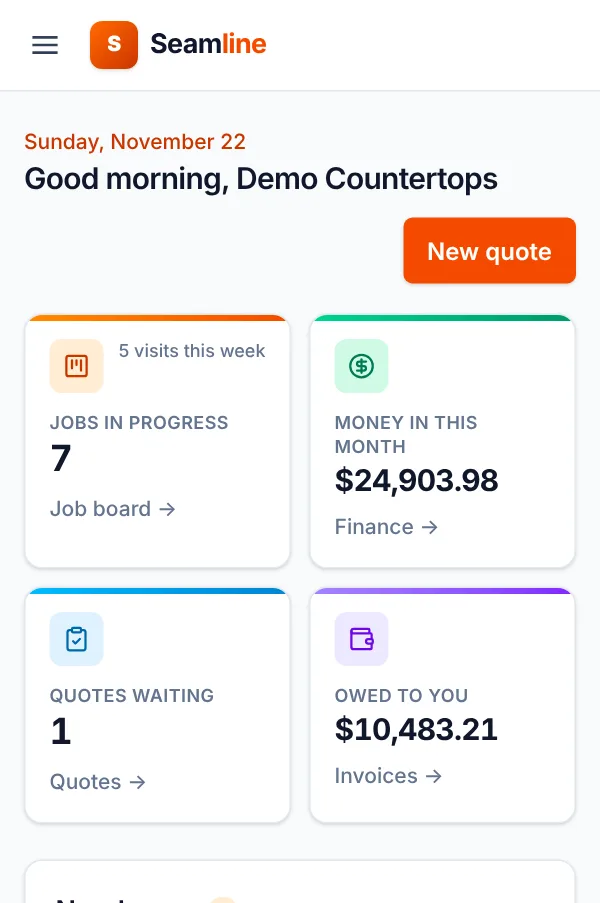
Seamline Today page on a phone with a big New quote button and cards for jobs and money

Sound familiar?

The headaches every shop knows

  • The slab you held is gone. The yard sold it, or the hold ran out and nobody called.
  • Remnants pile up out back. Nobody knows what's there, so you buy a new slab for a vanity.
  • The schedule lives on a whiteboard. And in three phones, and on a sticky note in the truck.
  • "That's not the vein I picked." The customer says it after the top is cut.

How it works

From the first call to getting paid

Every job moves through the same simple steps. Press one button to move it along.

  1. 1Quote itDraw the tops or type the sizes. The price adds up as you go.
  2. 2Hold the slabUse your own stock, or ask your supplier to hold one, right from the app.
  3. 3Lay it outThe customer sees each top on the real slab photo and signs.
  4. 4Cut and installYour crew sees what's next on their phone. The saw gets the file.
  5. 5Get paidSend the invoice. Customers can pay by card.

Quotes

A priced quote in a couple of minutes

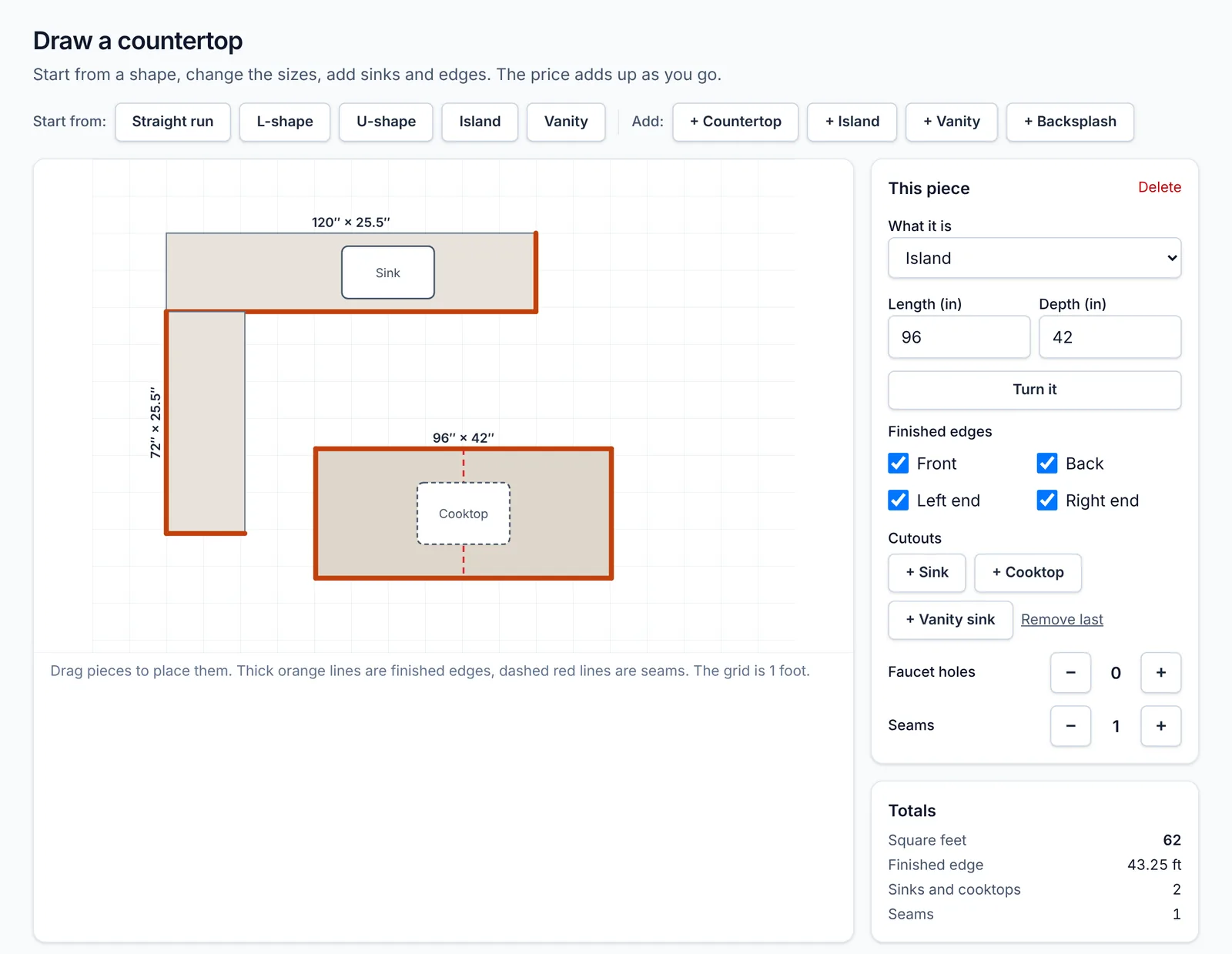
Pick a shape, change the sizes, add sinks and edges. Seamline does the square feet and the math using your own prices.

  • Start from a straight run, L-shape, U-shape, island or vanity
  • Paste a customer's email and it fills in the quote for you
  • Send it by text or email. The customer approves it on their phone
Seamline drawing tool: an L-shaped countertop and an island with sink and cooktop, with the price adding up at the bottom

Slabs and remnants

Know what's in your yard

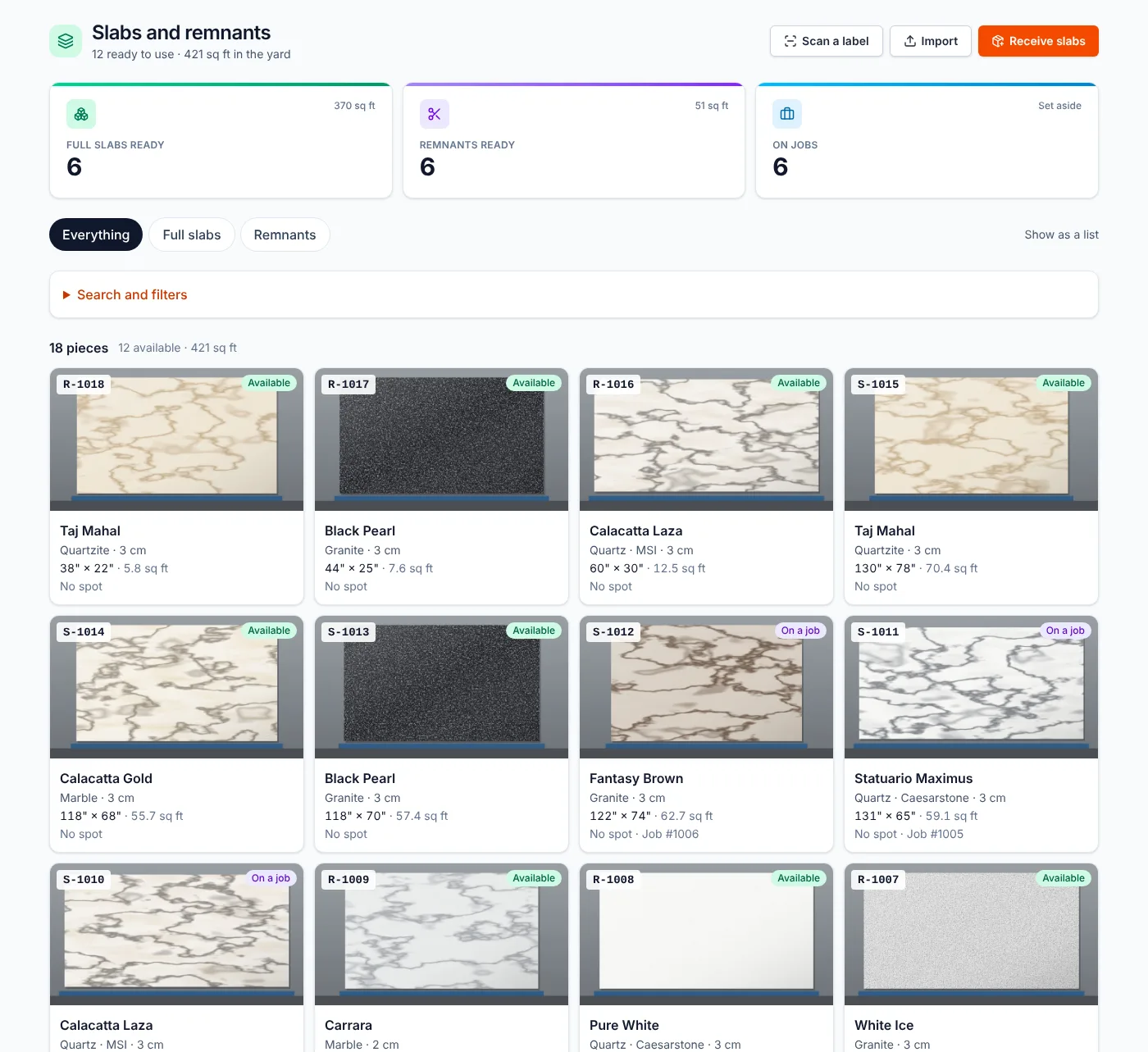
Every slab and remnant gets a photo, a size and a label. Scan the label with your phone to find it or move it.

  • When you cut a slab, save the leftover as a remnant in one step
  • Search remnants by color and size before you buy new
  • Purchase orders: receive the slabs and they're tagged and counted
Seamline slabs page with photo cards for each slab and remnant, showing size, stone type and whether it is available

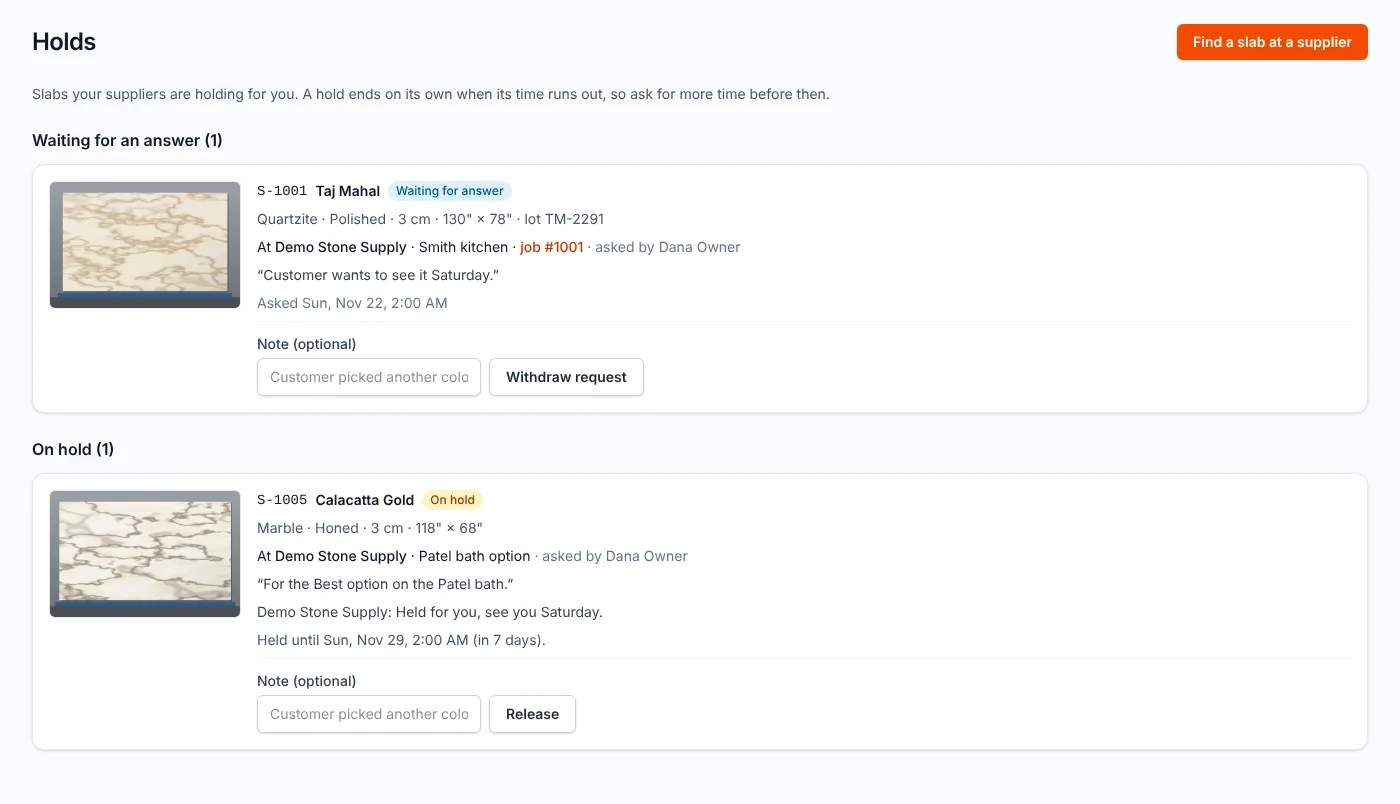
Slab holds

Holds that don't fall through

Send your supplier a link. They see your hold requests, say yes, and set how long they'll keep it. Their account is free.

  • Everyone sees the same hold, the same date and the same note
  • Pay the deposit by card when the supplier asks for one
  • Seamline reminds you before a hold runs out
Seamline holds page: one slab waiting for the supplier to answer and one on hold, with the date the hold ends

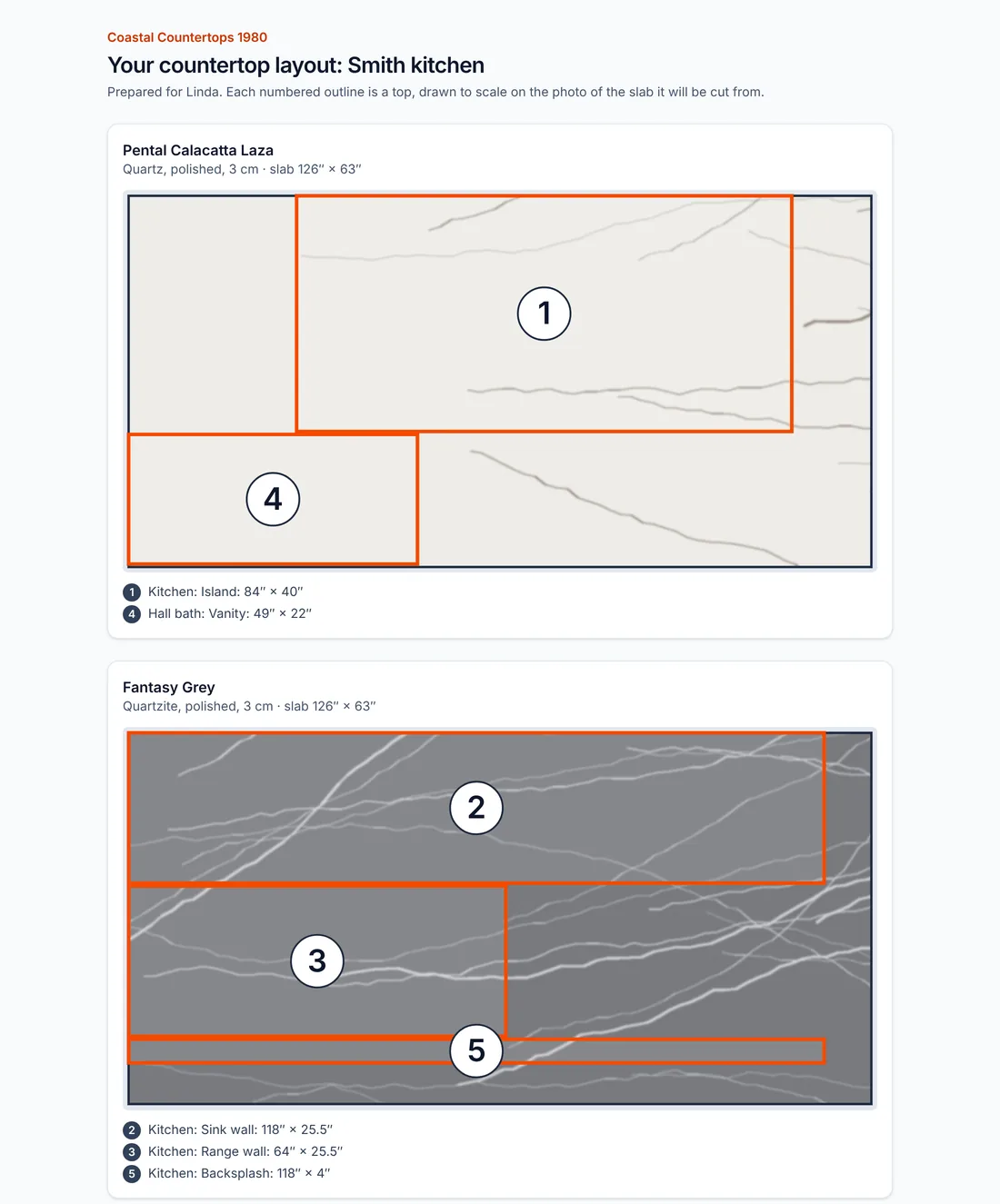
Layouts

The customer signs off before you cut

Place each top on the photo of the actual slab. Send the customer a link. They see exactly where the veins land and sign with their finger.

  • The signed layout is locked and saved with the job
  • Print a shop drawing (PDF) for the crew
  • Send a DXF file to your saw or CNC
Customer layout page: numbered countertop pieces drawn on two slab photos, ready for the customer to approve

Shop and crew

Everyone knows what's next

The Today page shows what needs doing and who's installing where. Your crew opens the same app on their phone. No training needed.

  • Shop board for template, cutting, fabrication and install
  • Cut list: check and sign off, then cut
  • Works on any phone, tablet or computer. Nothing to install
Seamline Today page on a phone: a big New quote button, a new quote request, and cards for jobs in progress, money in this month, quotes waiting and money owed

Easy from day one

Made for shops, not computer people

01

Plain words

Template, cut, install, paid. The words you already use in the shop.

02

Big buttons

Easy to tap on a phone, right there on the shop floor.

03

One next step

Every job shows one button for what comes next.

04

We set it up with you

We load your prices, your slabs and your customers. You don't start from a blank screen.

Pricing

One simple price

Everything Seamline does, for your whole shop. No charge per person. Month to month, cancel any time.

Pilot: 10 shops only, 90 days

Seamline

$299 $0/month

Free for your 90-day pilot. Then just $199 a month instead of $299, locked in for as long as you stay.

Everyone in your office, shop and crew included

Request a pilot

More than one location? Tell us in the form and we'll give you a price.

  • Quotes and the drawing tool
  • Customers and the job board
  • Shop schedule and crew phone app
  • Invoices and card payments
  • Slab and remnant inventory with labels
  • Supplier slab holds
  • Customer layout sign-off on slab photos
  • Cut list, shop drawings and DXF files
  • Purchase orders
  • Kitchen designer links
  • Reports and QuickBooks Online
  • We set it up with you

Why Seamline

Built by someone who sold slabs to shops like yours

Seamline started with years of selling slabs to fabricators of every size, plus dealers and wholesalers. The same problems came up again and again: holds that fell through, remnants nobody could find, and quotes on paper. Seamline is the tool those shops kept asking for.

We're starting with shops in Florida, and we set up every pilot shop ourselves.

Questions

Common questions

How much does it cost?

$299 a month for your whole shop, with every feature and every person included. Month to month, no contract. Pilot shops get 90 days free, then $199 a month for as long as they stay.

Do I have to type in all my customers, prices and slabs?

No. Bring them in from a spreadsheet, or send them to us and we'll load them. Seamline starts with typical countertop prices that you change to match your shop.

Does it work on a phone?

Yes. It works in any phone's web browser, and you can add it to your home screen like an app. Crews can see their day, take photos and scan slab labels, even with a weak signal in the yard.

Is there a charge for each person?

No. Your office, sales, shop and install crews are all included. Kitchen designers you work with get their own login for free.

Can customers pay by card?

Yes. Invoices and deposits can be paid by card through Stripe, and the money goes straight to your own Stripe account. Seamline never sees or stores card numbers.

Does it work with QuickBooks?

Yes, QuickBooks Online. Invoices and payments are sent over for you, so nobody types them twice.

Can it send files to my saw or CNC?

Yes. Each job's layout downloads as a DXF file for the saw, plus a PDF shop drawing and a cut list. Seamline isn't a full CAD program, and it doesn't try to be.

Who owns my data?

You do. Download your customers, jobs, slabs and invoices to a spreadsheet whenever you like. It's backed up every night.

Request a pilot

Be one of the first 10 shops

We're taking only 10 shops for the first pilot. You get it free for 90 days, then $199 a month for life instead of $299, and we set it up with you. In return, tell us what works and what doesn't.

Fill this in and we'll call you within one business day.

  • No credit card needed
  • Setup done with you, in person or by phone
  • We never sell or share your details

By sending this you agree we can call or email you about Seamline. Privacy